

Compare two AIs side by side: Battle mode
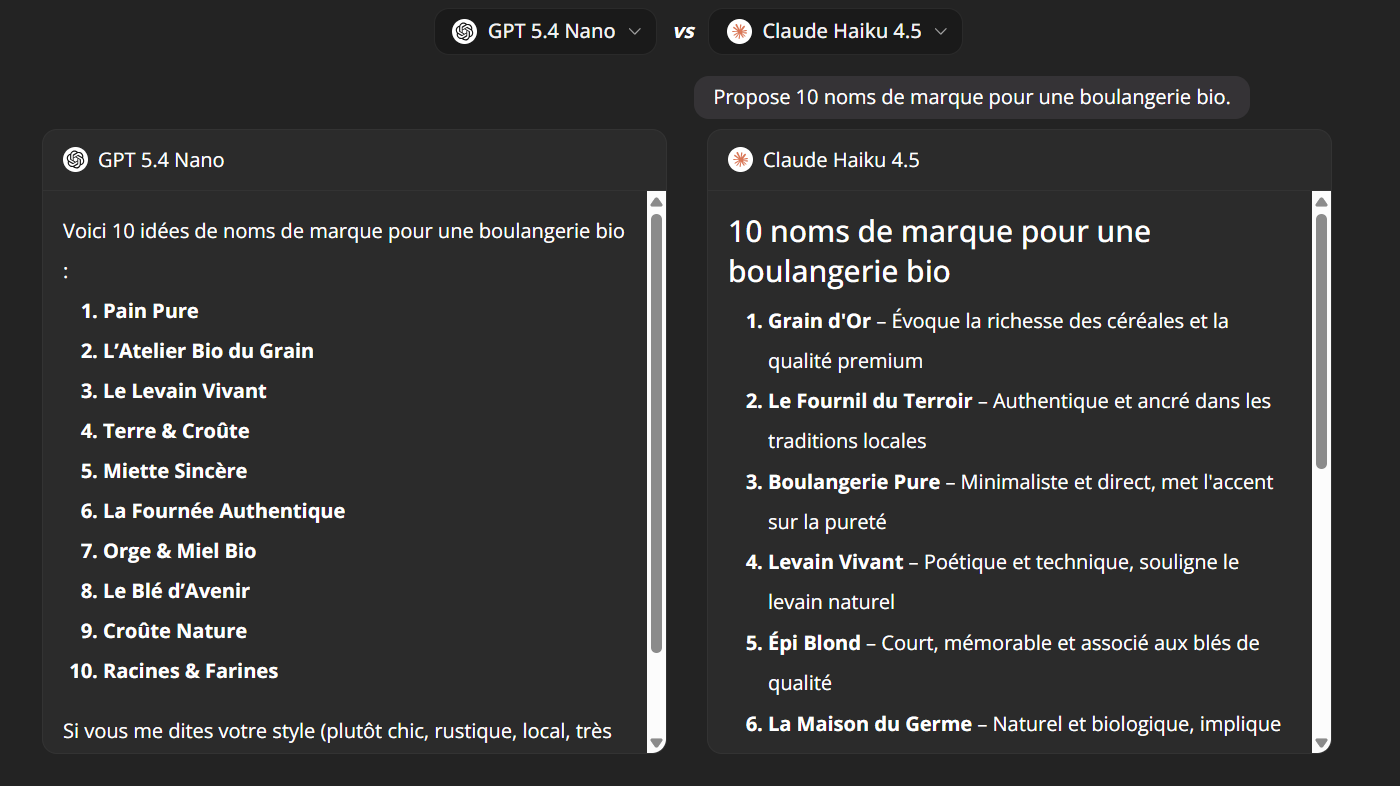
ChatGPT, Claude, Gemini, Mistral, Grok… Which AI answers your question best? Instead of juggling several tabs and several subscriptions, Ai-ChatPro lets you compare two AIs side by side, with the same prompt, on a single screen.
That's the idea behind an AI battle: two models, one question, two answers shown at the same time. You judge for yourself, on your own use cases.
Why compare two AIs?
Every model has its strengths. One writes better, another reasons more rigorously, another codes more cleanly or answers faster. Only a direct comparison tells you which one is best for your needs.
Common use cases:
- ChatGPT vs Claude: which AI writes the best email, article or summary?
- Free model vs premium model: is the quality gap worth the extra cost?
- Choosing your go-to model: find the AI to use every day.
- Checking an answer: a second opinion avoids relying on a single model.
- Comparing image models: which AI generates the visual closest to your idea?
What you can compare on Ai-ChatPro
| Type | What you get |
|---|---|
| Text models | More than 40 LLMs, from major families such as OpenAI (GPT), Anthropic (Claude), Google (Gemini), Mistral, xAI (Grok), Perplexity |
| Image models | Compare image generators: same prompt, two results side by side |
| Combinations | Every possible pair: a recent model against an older one, a budget model against a high-end one… |
Tutorial: compare two AIs in 4 steps
- Open the “Compare two AIs” tool. From your Ai-ChatPro space, go to the comparison tool. Two columns appear: one on the left, one on the right.
- Choose the first model (left selector). In the left selector, pick the first AI. Example: Claude.
- Choose the second model (right selector). In the right selector, pick the AI to compare it with. Example: GPT or Gemini.
- Write your prompt and compare the answers. Type your question once. It is sent to both AIs at the same time, and the answers appear side by side. Read, compare, choose.
Tip: for a useful comparison, match two models of the same category (two premium models, or two fast models).
Example prompts for a good comparison
- Writing
“Write a follow-up email to a client, professional but friendly tone, 100 words max.”
- Reasoning
“Explain the difference between a real estate fund and life insurance, with a worked example.”
- Code
“Write a Python function that removes duplicates from a list while keeping the order.”
- Summary
“Summarize this text in 5 key points: [paste the text]”
- Creativity
“Suggest 10 brand names for an organic bakery.”
- Image
“An astronaut cat on the Moon, watercolor style, soft light.”
Compare two image models
The principle is the same: choose an image generator in each selector, describe the image you want, and get both results side by side. You instantly see which one best follows your description, the style and the details (hands, text, proportions…).
Frequently asked questions
Can I compare ChatGPT and Claude on Ai-ChatPro?
Yes. Pick an OpenAI model on the left and a Claude model on the right: it's the most requested “ChatGPT vs Claude” matchup.
How many models can I compare?
More than 40 language models, plus several image generation models.
Do I need a separate account for each AI?
No. Every model is available from Ai-ChatPro.
Can I compare AI-generated images?
Yes, on the same principle: one prompt, two generators, two results side by side.
Is the comparison objective?
It reflects your own needs. No ranking replaces a test on your own prompts.